Blog

  • · Blog · 3 min read

    Map and Mission Editor Version 2.0

    Klofkac has released an update for his Map and Mission Editor, this time reaching version 2.0
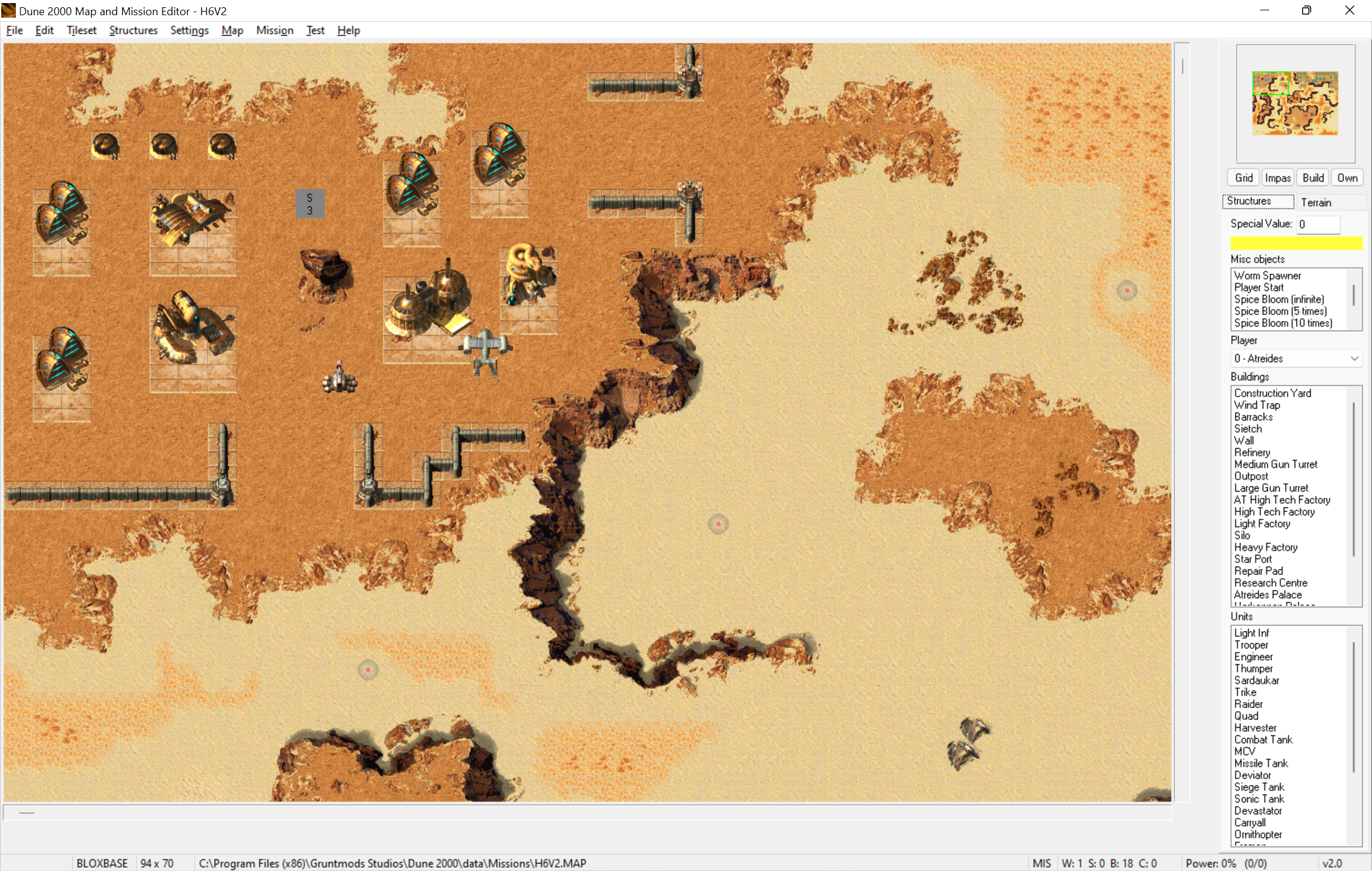

    Here is list of changes done since the last release (pre-release 5):

    • Added: When you attempt to save over original game file (map, *.bin etc.) editor will show a warning and let you choose not to save
    • Added: When you have configured Campaign and Mods folder on your mission and attempt to save changes in structures or tileatr editor, editor will automatically save the files into Mods folder (and automatically create Campaign and Mods folder if it did not exist)
    • Added: Structures editor will save only those files (*.bin, data.r16, sound.rs) where any modifications were made. That does not apply to Templates.bin, Armour.bin, Builexp.bin, those will be always saved regardless if modified or not.
    • Changed: Renamed “firing flash” to “muzzle flash”
    • Added: More “Save and test” options in Structures editor (i.e. launching a game without launching any mission)
    • Added: In Structures editor you can view images in raw mode, as well as in player colors of any of 8 players. You can also view image palette.
    • Added: Export and Import images in structures editor. You can import a 256-color paletted bmp image and you can import your custom palette this way. You can import building/unit icon by clicking on that icon. You can edit image’s frame size and offsets.
    • Added: You can edit Samples.uib entries in structures editor and rename sounds in Sound.rs. Added: Export and import unit voice data. It will import samples.uib entries as well as .wav files into sound.rs automatically.
    • Added: Manuals (mapping manual, event and condition manual…) are stored in “doc” folder and are accessible from Help in main menu
    • Fixed: Finite spice blooms now have proper names (number of respawns) in misc. object list
    • Added: Mission launcher feature (replacing game files with files from mods folder). If you set the config “CleanUpExtraModFilesAfterLaunch” in D2kEditor.ini to true, it will automatically clean up all extra files after the game ends, so it will leave your Dune2000 folder clean and in same state as before launch.
    • Changed: Simplified “Launch with settings” dialog Fixed: Worm spawner is now treated as a normal unit and is counted in map statistics, which now give the exact proper number of total structures in a map.
    • Added: Crate counter (to be used when static crates are supported)
    • Added: Automatic “Apply changes” in Events and Conditions window. You no longer need to click Apply changes button or press Enter every time you do a change in a mission or event. Your changes are automatically applied when you switch to a different event/condition, on closing window and on saving a map.
    • Added: In structures mode you can erase structures when right button is held and mouse is moved


    Click here to view the page

    Discuss this on the forum

    Posted by: gruntlord6

  • · Blog · 3 min read

    Map and Mission Editor Version 1.3

    Klofkac has released an update for his Map and Mission Editor, this time reaching version 1.3.


    Changelog:

    Fixed: Size preset buttons in Tileset window were off by one position
    Added: Find object feature
    Changed: Some options (i.e. Show grid) are now toggle buttons below minimap instead of Settings menu items
    Removed: Draw concrete option (now is always on)
    Added: Play Sound event: now provides dropdown list of sound names (loaded from "samples.uib")
    Added: Play Music event: now provides dropdown list of music names (list of existing .AUD files in "Data\Music" folder)
    Fixed: Set Attack Building Rate event: value is named "Arrack rate" instead of "Unknown" 
    Fixed: Casualties condition: "Flags?" value renamed to "Proportion" and changed to floating-point number type
    Added: When temporary "TESTMAP.MAP" file is saved, the map name in ini file is renamed to "TESTMAP" 
           in order to avoid duplicate entry in mission launcher
    Added: Open recent files feature
    Fixed: Editing marker (i.e. building marker, current block) not showing when Mission settings or Events/Conditions 
           window is open and is on background or minimized
    Added: "MissionsPath" setting in .ini file. It can be changed in case game loads maps/mission files from different location
    Fixed: The UI components now should not be messed up on systems where scaling is set to different value than 100%
    Added: Highlighting events having selected condition feature
    Fixed: Program now checks, if window would appear off-screen (i.e. previously opened on second monitor which is now
           unplugged) and resets its position
    Changed: Program now automatically loads all all .ini files placed into "tilesets" folder, instead of loading tileset list
             from "config\tilesets.ini". All tileset .ini files must now contain name of attributes file.
    Added: Loading tileset images directly from game's internal .R8 and .r16 files
    Removed: Editor is no longer distributed with tileset .bmp files
    Fixed: Improved auto-detection of game folder, detection of missions stored under "Data\Missions" folder
    Changed: Mission settings window should fit 1024 pixels wide resolution
    Added: Tileset name and Attributes fields on Mission settings window
    Added: Custom Text.uib field on Mission settings window (mission .ini file)
    Added: Conditions can be organized by moving up and down (like events)
    Added: Grid color setting and several more settings
    Added: AI manual (written by Cm_blast)
    Added: AI templates (created by Cm_blast)
    Added: Information message upon start when starting program for the first time
    Fixed: Some errors on BLOXBAT tileset configuration, added missing tiles to new "Sand stains" preset group
    Added: README.txt file


    Click here to view the page

    Discuss this on the forum

    Posted by: gruntlord6

  • · Blog · 1 min read

    Dedicated Server Move Complete

    Recently we completed a move to a dedicated server. Rather than sharing a virtual server (VPS) with other users, this allows us to have consistently fast connections and full access to the CPU and RAM (with copious amounts to spare). gruntmods.com has also been moved to the dedicated server, however, the downloads are still served from a separate VPS to ensure optimal download performance. If you experience any issues with the site, please let us know.